
Introducing Daily Brief: Walk Into Every Meeting Prepared
A vague calendar entry almost cost our CEO a media interview. Daily Brief saved him. Now every Contio user gets personalized prep, every evening.
How Daily Brief Saved Me
It all started with a vague calendar invitation called “Katie + Aaron.” The new MeetingOS Daily Brief flagged it the evening before as the most important meeting on my next day’s calendar.
It turned out the meeting was a media interview. Daily Brief had pulled the context from a thread in my inbox I’d half-forgotten about, surfaced that it was an interview, and recommended I prep four or five sharp talking points before the call.
Since I use Contio to capture all of our meetings, I asked Contio to draft the talking points. It came back with five — four of which were great. The fifth I threw out. The next morning, Katie emailed her questions ahead of the call. I pasted them into Contio and asked it to reorganize the brief around them.
By 9am I had a structured, interview-ready game plan that was 100% me with 5% of the work.
I walked in prepared.
The day our media intern received his first Daily Brief, it alerted him to a final exam that he had forgotten about the next day! Daily Brief might save your bacon too.
Calendar entries don’t tell you what really matters.
Most knowledge workers walk into meetings underprepared. Not because they don’t care — because the prep is tedious. Reviewing emails, digging through prior notes, triangulating context across tools. It’s the work before the work, and it’s the work that gets skipped.
The calendar can make this worse, not better. Half your calendar invites are too vague to tell you what really matters about a meeting. The other half are recurring meetings where the context lives somewhere else — in a thread, a doc, a decision someone made three weeks ago that you’d have to remember to look for.
Notetakers help you remember what was said after the meeting. Daily Brief helps you walk in ready to contribute.
Now you don’t have to build this yourself
I know engineers who have wired their own version of this together — connecting their calendar to ChatGPT or Claude, plugging in their email, writing prompts that pull in the right context. If you know how to wire up AI agents and you have a free weekend, it’s doable.
Even then, you’d still be missing what makes Daily Brief actually work: the gold mine of what’s happening in your meetings. A DIY agent could read your calendar and your email, but every meeting transcript would have to be fed in after the fact. Contio captures all of that for you, silently — so your Daily Brief draws on every relevant conversation your team has had, not just what’s sitting in your inbox. Every meeting makes the next one smarter.
Most people don’t have a free weekend. Or the desire to configure MCP servers, install skills, or manage code.
We built Daily Brief so you don’t have to. And we built it so your data stays yours: 100% of AI processing happens in our secure private cloud, and we never store or record audio of your meetings. Your data is never used to train foundational models.
No bot. No recording. Just intelligence.
Here’s what Daily Brief actually does
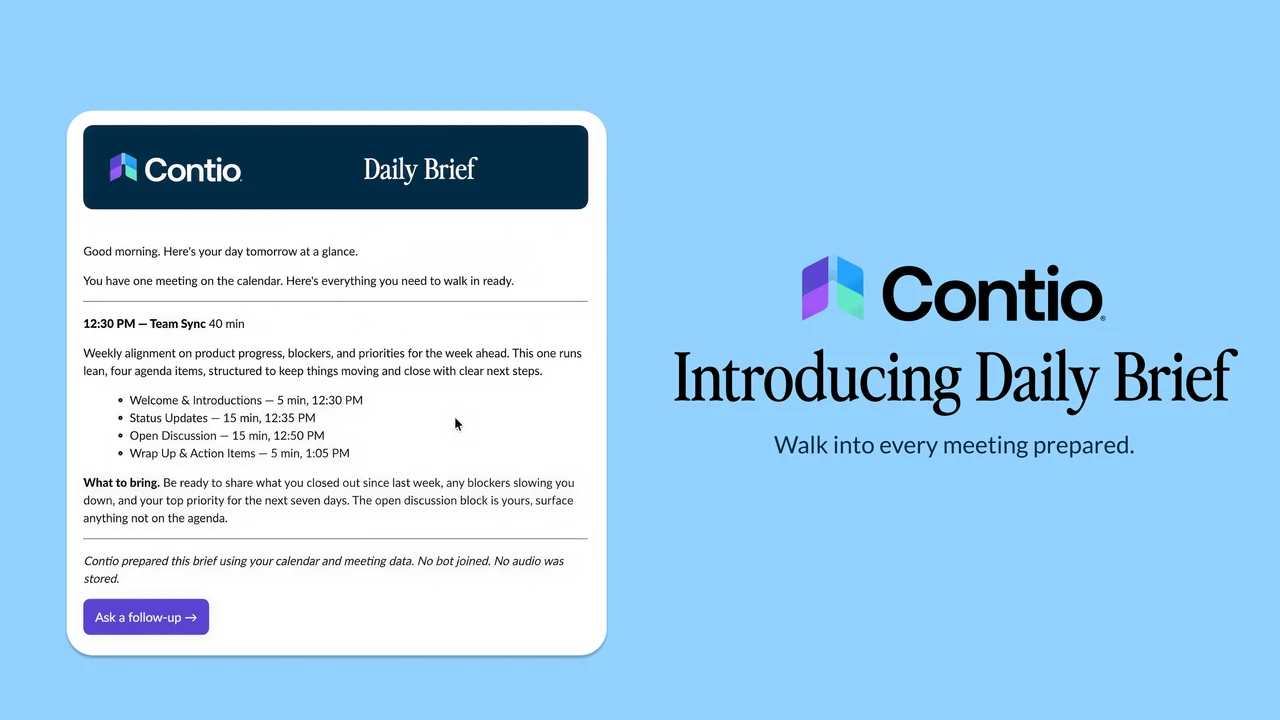
Every evening, Contio reviews tomorrow’s calendar and preps you for the day ahead. Think of Daily Brief as an AI chief of staff that builds a personalized brief for each meeting — pulling in prior meeting context, recent email threads, and relevant docs. By around 6pm local, your brief lands in your inbox.
For recurring meetings, Daily Brief leans on your prior meeting history — action items, open decisions, threads that didn’t get closed last time. For new meetings, it relies on your email and documents to figure out who the attendees are and what the meeting is actually about. For meetings you’ve declined, it stays out of your way.
Click a button in the Daily Brief email to open a chat in Contio and ask follow-up questions, add talking points, or reorganize the brief around new information — like the way I pasted in an interviewer’s emailed questions and asked Contio to reshape my prep around them. The brief is a starting point, not a finished artifact. It gets sharper the more you use it.
How it shows up in your day
Tonight at 6pm local, your first Daily Brief lands in your inbox. Tomorrow morning, you walk into your meetings with everything you need already in one place: context, prior decisions, open commitments, who’s joining — handled before you even think about it.
If your calendar is clear tomorrow, so is your inbox. We won’t bother you if there are no meetings to prep for.
Want a text message with the highlights pointing back to the brief? Simply add your phone number in your profile.
Get started today
Daily Brief is part of the Elite plan, and for the month of May, everyone using Contio is getting a free preview.
If you’re already a MeetingOS user, you’re set. Your first brief arrives tonight at 6pm local, no setup required. To get the most out of it, make sure your Google or Microsoft account is connected (it connects the dots across your calendar, email, and documents).
If you’re new to Contio, sign up for MeetingOS for free. We’ll give you a few weeks of Daily Brief as a preview. Just connect your Google or Microsoft account, and your first Daily Brief will be in your inbox this evening.
Walk in prepared.
Every time.
—Aaron